
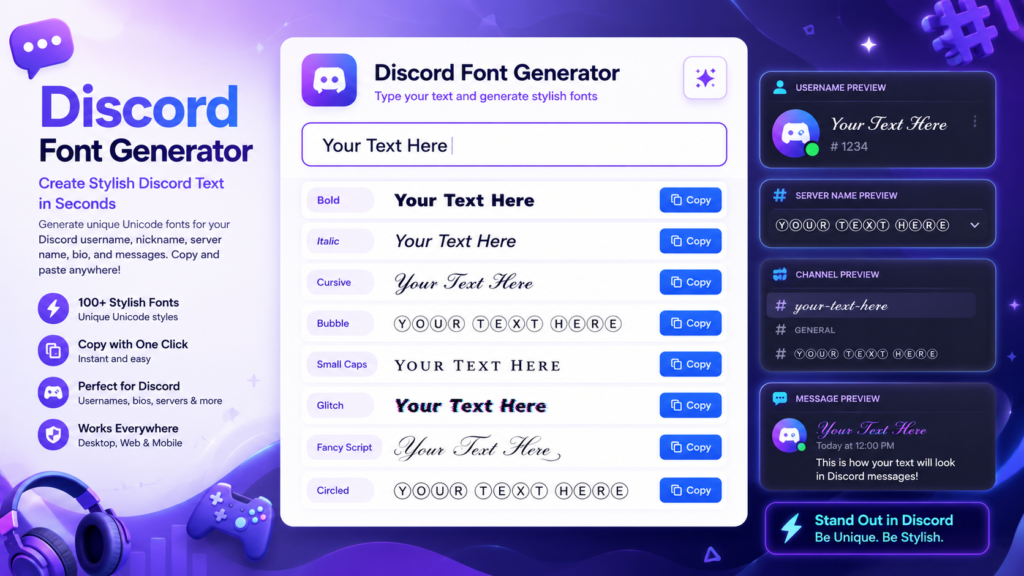
Discord Font Generator
Create stylish Discord text instantly with our free Discord Font Generator. Type or paste your text below to convert it into fancy Unicode fonts that can be copied and pasted into Discord usernames, display names, server names, channels, messages, and profiles. No downloads, registration, or font installation required just generate, copy, and paste.
Start typing above to see your text transformed into 120+ fancy styles.
Why Use Our Discord Font Generator?
- Create unique Discord usernames in seconds.
- Copy and paste stylish Discord fonts with one click.
- Works on desktop, mobile, and web versions of Discord.
- More than 100 Unicode font styles available.
- No downloads or account registration required.
- Compatible with many social media and gaming platforms.
- Completely free to use anytime.
What Is a Discord Font Generator?
A Discord Font Generator is a free online tool that transforms ordinary text into stylish Unicode characters. Instead of installing custom fonts, it converts your words into decorative text that can be copied and pasted directly into Discord.
The generated text is perfect for creating eye-catching usernames, server names, nicknames, channel titles, and messages. Because it uses Unicode characters, the text works across most modern browsers, devices, and applications without requiring any additional software.
Whether you want a cool gaming identity, a unique community name, or stylish chat messages, our Discord Font Generator makes it quick and easy.
How Does the Discord Font Generator Work?
Our generator converts standard letters into Unicode characters that resemble different font styles. These are not traditional font files but special characters recognized by the Unicode standard.
Simply type or paste your text into the generator. It instantly creates dozens of stylish Discord font variations. Choose your favorite style, click the Copy button, and paste it into Discord wherever Unicode text is supported.
How to Use the Discord Font Generator
- Type or paste your text into the generator.
- Browse through the available Discord font styles.
- Select the style you like best.
- Click the Copy button.
- Paste the generated text into Discord.
Where Can You Use Discord Fonts?
Stylish Discord text can be used in many places across the platform, including:
- Discord usernames
- Display names
- Server names
- Channel names
- Discord bios
- Status messages
- Chat messages
- Community announcements
- Gaming profiles
- Role names
Popular Discord Font Styles
- Bold Unicode Text
- Cursive Script Fonts
- Bubble Text
- Small Caps
- Monospace Text
- Circled Letters
- Squared Characters
- Glitch Text
- Fancy Decorative Fonts
- Symbol-Based Text
Platform Compatibility
| Platform | Supported |
|---|---|
| Discord | ✔ Yes |
| Desktop App | ✔ Yes |
| Discord Web | ✔ Yes |
| Android | ✔ Yes |
| iPhone (iOS) | ✔ Yes |
| Windows | ✔ Yes |
| Mac | ✔ Yes |
| Linux | ✔ Yes |
Tips for Using Discord Fonts
- Choose readable font styles for usernames.
- Avoid excessive decorative symbols that may reduce readability.
- Preview your text before saving your profile.
- Keep a plain-text version for platforms that restrict Unicode characters.
- Use stylish fonts to make important announcements stand out.
- Combine Unicode fonts with emojis for a unique look.
Frequently Asked Questions
Is the Discord Font Generator free?
Yes. Our Discord Font Generator is completely free to use without registration or subscriptions.
Does Discord support stylish Unicode fonts?
Yes. Discord supports most Unicode characters, allowing many stylish text styles to display correctly in usernames, messages, and server names.
Do I need to install any fonts?
No. The generator uses Unicode characters that are already supported by most devices and browsers.
Can I use Discord fonts on mobile?
Yes. The generated text works on Android and iPhone devices as well as the desktop and web versions of Discord.
Can I copy and paste Discord fonts?
Yes. Simply generate your preferred style, click Copy, and paste it directly into Discord.
Why do some font styles look different on other devices?
Unicode characters may appear slightly different depending on the operating system, browser, or device being used.
Can I use these fonts for gaming usernames?
Yes. Many users create stylish gaming usernames using Unicode text for Discord, Steam, Twitch, and other gaming platforms.
Is there a character limit?
The generator has no character limit, but Discord itself may limit the number of characters allowed in usernames, nicknames, and status messages.
Does this generator affect my Discord account?
No. The tool simply generates Unicode text. It does not access your Discord account or require any login.
How do I remove the styling?
Replace the decorative Unicode text with standard text or paste it into a plain text editor before copying it again.
Explore More Font Generators
Looking for more creative Unicode text styles? Explore our complete collection of free font generators. Create stylish text for Instagram, Facebook, Discord, TikTok, WhatsApp, gaming usernames, social media bios, websites, and more. Every tool is free to use and lets you copy and paste your favorite text instantly.
- All Font Generators
- Instagram Font Generator
- Facebook Font Generator
- Discord Font Generator
- Cursive Font Generator
- Bubble Text Generator
- Glitch Text Generator
- Zalgo Text Generator
- Tiny Text Generator
Final Thoughts
Our free font generators make it easy to create stylish Unicode text that works across most modern websites, messaging apps, and social media platforms. Simply type your text, choose your favorite style, copy it with one click, and paste it wherever you want. Whether you’re customizing your Instagram bio, Facebook posts, Discord username, gaming profile, or creating eye-catching content, our collection of font generators gives you hundreds of creative text styles in seconds—completely free and with no registration required.
